Most content flops because it copies the wrong thing. Spy shows you what is working in your niche this week, explains why, and turns any of it into your own version in two clicks. Spy is already in your Dashboard. Open the Team Inbox and click Spy under Agents. It has three tabs: Chat, Organic and Ads.

Chat

Ask Spy a question in plain words. Spy runs the research, then replies with a short brief: the two or three patterns worth copying, why the top videos work, and what to make first.
  • “What’s trending in my niche right now?”
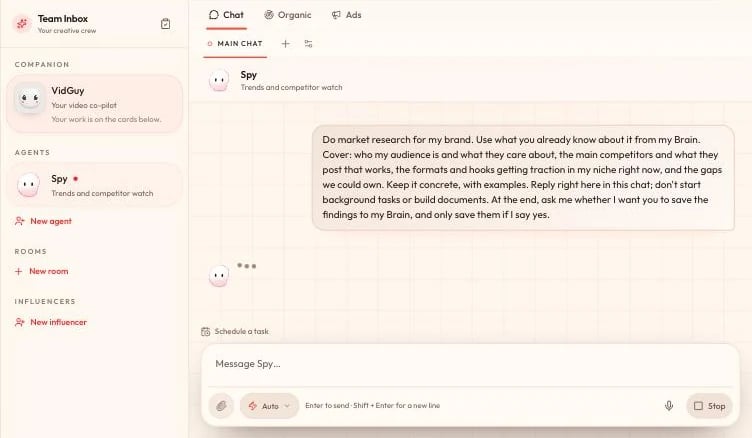
  • “Do market research for my brand. Who is my audience and what do my competitors post that works?”
  • “Pull the ads my competitors are running and tell me which ones they’re scaling.”
Each scan drops a card in the chat with the top videos. Click it to see everything in the Organic or Ads tab.
Spy chat with a market research request

Ask Spy for market research in plain words.

Organic

The Organic tab keeps every TikTok video Spy has found for you. Library shows all of it. Runs lists each scan with its topics and what it cost. Click Run research to start a scan yourself. Add Topics or #hashtags, optional Creators (your competitors’ handles), pick how far back to look, and click Scan now.
  • One scan costs 5 credits. It looks at 30 videos and takes about a minute.
  • Up to 6 topics and 3 creators per scan.
  • Failed scans are refunded. If a scan fails or finds nothing, you get the 5 credits back.
  • Winning UGC is free. Spy can also search VidGuy’s library of UGC videos that already performed. Those results land here too, marked Winning UGC.
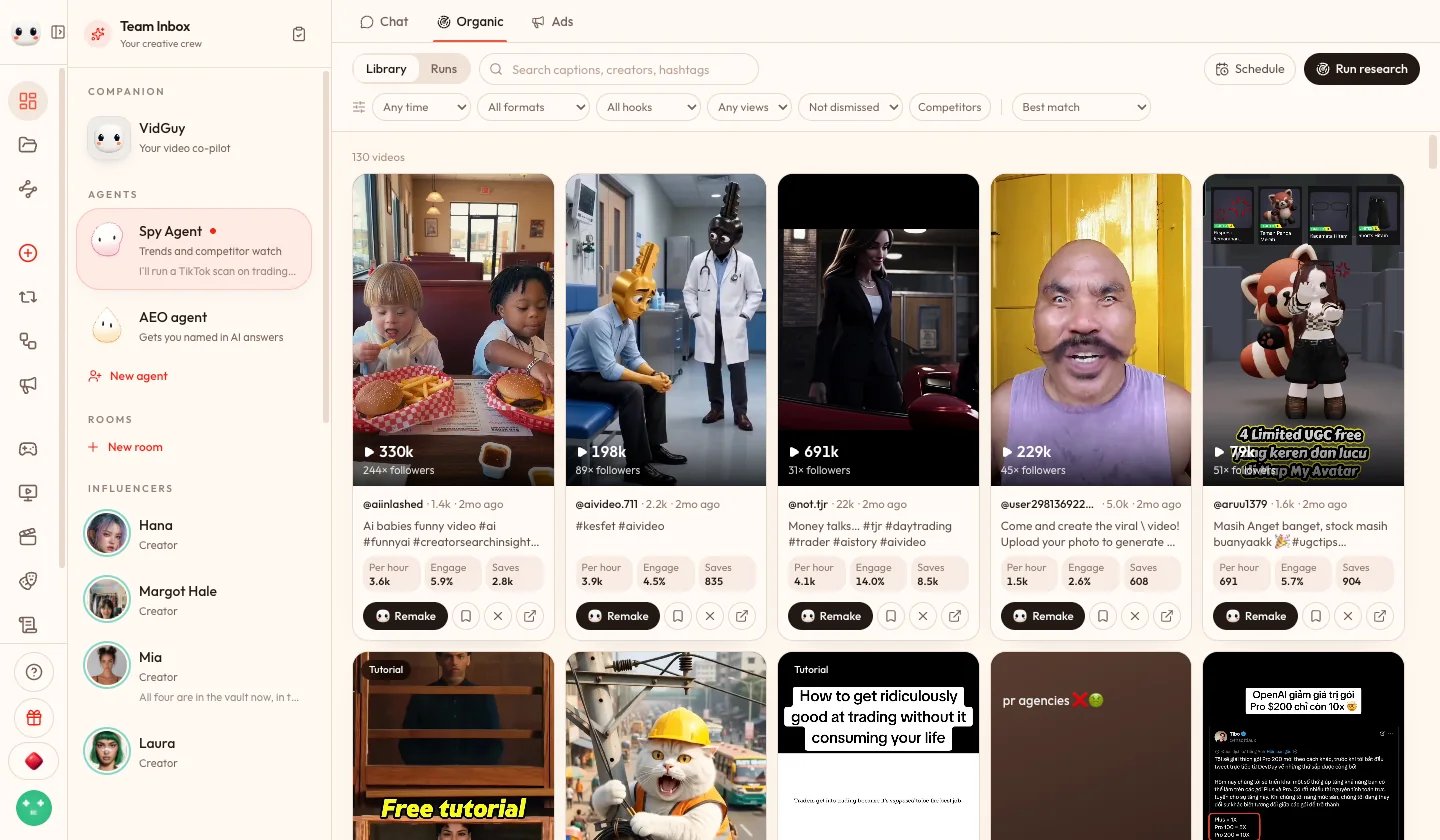
Use the bar at the top to narrow it down: search captions, creators and hashtags, then filter by Posted time, format, hook, Views (10k+, 100k+, 1M+), saved or dismissed, and Competitors only. Sort by Best match, Most views, Rising since last scan, Fastest growing or Newest.
Spy Organic tab with scored videos, filters, Schedule and the Run research button

The Organic tab: every video Spy found, with views, engagement and a Remake button.

How Spy scores a video

Spy only keeps videos with at least 1,000 views, and it skips paid ads. Then it scores each one on three things:
  • Reach: views compared to the creator’s followers. A video at 8× followers broke out beyond the creator’s own audience.
  • Speed: views per hour since it was posted. Older videos lose points.
  • Fit: how well it matches your brand and how easy it is for you to copy. The bar on each card shows the % fit.
Each card also shows the format (like Tutorial or Product ad) and the hook (like Money, Ease or Curiosity). Scan the same topics again and Spy shows which videos are still climbing.

Ads

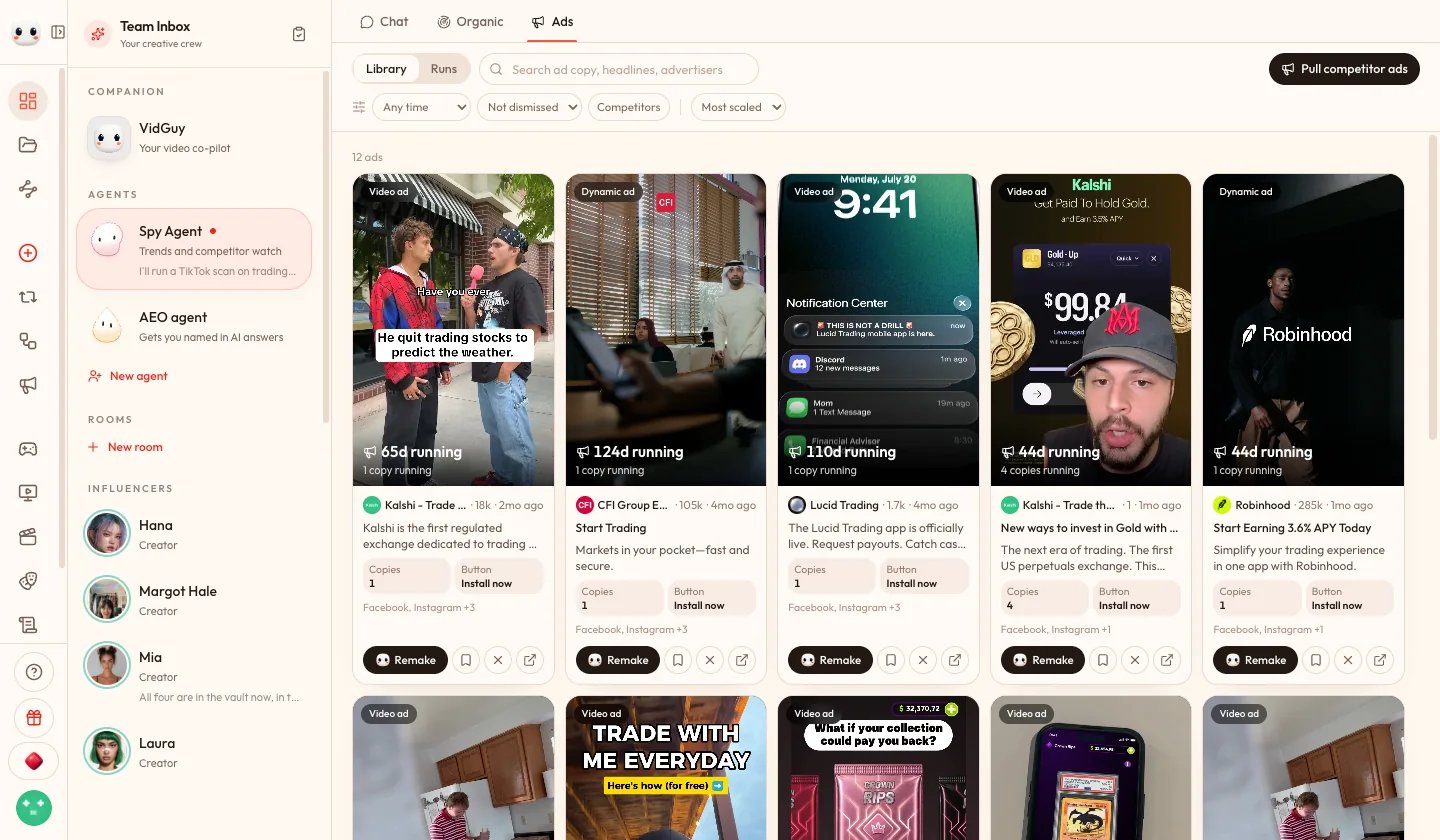
Spy Ads tab showing competitor ads with days running, copies and a Remake button

The Ads tab: competitor ads with how long each has been running.

The Ads tab shows the ads your competitors are running on Facebook and Instagram. Click Pull competitor ads and Spy drafts the request in chat. Add competitor names, or leave them out and Spy uses the competitors saved in your Memory.
  • One pull costs 3 credits. Refunded if nothing is found.
  • Up to 3 competitors per pull.
  • Ranked by how hard they’re scaled. Ad libraries don’t publish spend, so Spy reads days running and copies running as the signal. An ad that has run for weeks in several copies is one they keep paying for.

Make it yours

Every card has a Remake button. Pick VidGuy and a new chat opens with the video, its format and hook already filled in. Pick one of your AI influencers and they make their own version. Use Save to keep a card and Dismiss to hide it. Dismissed videos stay out of future scans.

Save findings to Memory

Ask Spy to save what it found, like “Save these findings to my Brain.” Spy only saves when you say so. Saved findings go to your Memory, so VidGuy and every agent use them in the next script.

Run it every week

Click Schedule on the Organic tab to set up Weekly research. Spy rescans your last topics every Monday morning and briefs you on what to copy this week. Each scheduled scan costs 5 credits. Scheduled tasks are on paid plans: up to 3 on Starter, 10 on Pro and unlimited on Scale.